 Onibaku
HMRC’s own schedule, filled in
Gift Aid Schedule Builder is for church, club and charity treasurers who keep donations in Google Sheets™. Check every donor against HMRC’s rules before you claim, then download HMRC’s own Gift Aid schedule, filled in and ready to attach to your Charities Online claim. No copying and pasting, so no “ASM” upload errors.

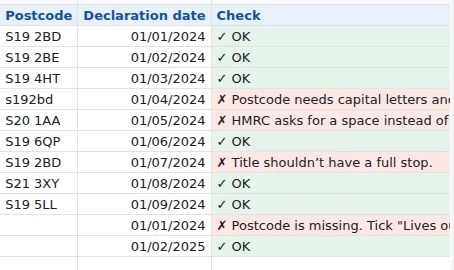
Errors shown on the row, not by HMRC
Fixed in a click
Postcodes, title and name lengths, stray spaces, hyphenated surnames, house numbers, dates and amounts are checked against HMRC’s published rules. Most formatting slips are fixed in one click.
Declarations kept with the donor
Record each donor’s Gift Aid declaration, what it covers and any cancellation. Donations it doesn’t cover are flagged and left out of the claim.
Never claim the same gift twice
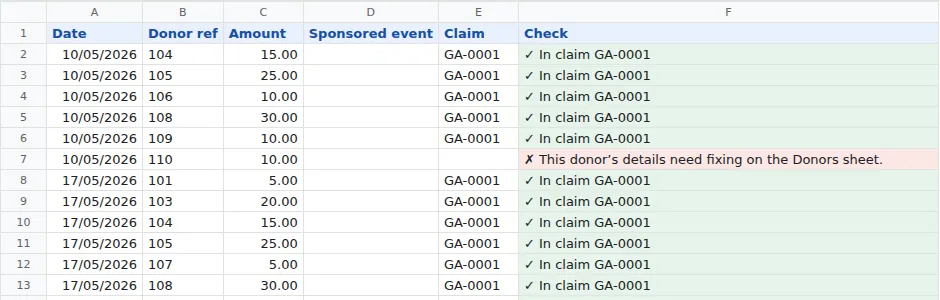
Each claim gets a reference, and every donation in it is stamped with it. The Claims tab keeps your history, and you can download any claim again.
Getting started
- Open a Google Sheet and choose Extensions → Gift Aid Schedule Builder → Open.
- Press Set up Gift Aid sheets. It adds four tabs: Donors, Donations, Small donations and Claims. If you already keep these, rename your tabs to match: columns are found by their heading, so “Surname”, “Envelope no.” and “Post code” work too.
- On Donors, add each donor with their declaration date and what it covers. On Donations, add each gift with the date, the donor’s ref (or full name) and the amount.
- Press Check sheets. Each row’s Check column says what, if anything, HMRC would reject. Fix formatting sorts out spacing, postcode capitals and similar slips for you.
- Choose the date to claim up to and press Create claim and download.
- In Charities Online, attach the downloaded file as your Gift Aid schedule. Don’t open and re-save it first.
The columns
| Tab | Columns |
|---|---|
| Donors | Donor ref, Title, First name, Last name, House name or number, Postcode, Lives outside UK, Declaration date, Declaration covers, Declaration cancelled |
| Donations | Date, Donor ref, Amount, Sponsored event, Aggregated description (optional), Claim (filled in by the add-on) |
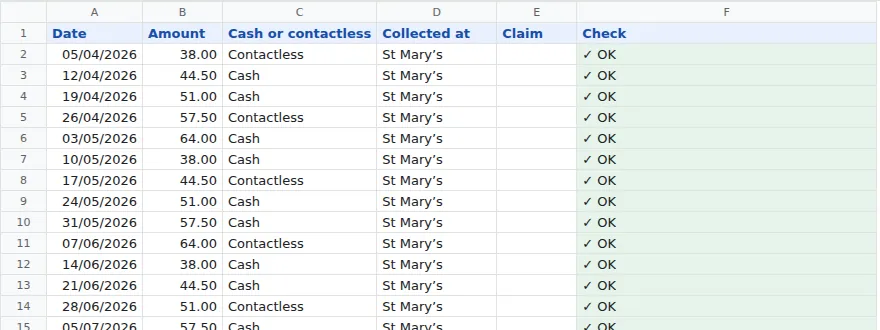
| Small donations | Date, Amount, Cash or contactless, Collected at, Claim (filled in by the add-on) |
The add-on adds a Check column to each tab. Any other columns you keep, like email or notes, are left alone.
Declaration covers is one of “Past 4 years and future” (HMRC’s usual wording), “Future donations” or “One donation only”. Left blank, a declaration covers donations from its date onwards.
Donors abroad: choose Yes under Lives outside UK and put their whole address in the house box. The schedule gets an X for the postcode, as HMRC asks. Donors in the Isle of Man and the Channel Islands count as living outside the UK.
What gets checked
Every rule comes from HMRC’s schedule guidance, the notes in HMRC’s own template and the Charities Online data specification.
- Title: 4 letters at most, no full stop (Mr, Mrs, Dr, Prof, Rev).
- First name: 35 characters at most, with no spaces, or an initial.
- Last name: 35 characters at most, with a space rather than a hyphen in double-barrelled names.
- House name or number: 40 characters at most.
- Postcode: a real UK postcode format, in capitals with one space.
- No spaces at the start or end of any box, no line breaks or hidden characters.
- Dates: readable, not in the future, and within HMRC’s 4-year claim window.
- Amounts: numbers above zero with at most 2 decimal places, no £ sign.
- The donation’s donor exists and has a declaration that covers that date and hasn’t been cancelled.
- Sponsorship: Yes or blank, and gifts over £500 go in as normal donations. Aggregated lines: a short description, £1,000 at most, never sponsorship.
Bigger claims (Pro)
Any number of donations
HMRC’s schedule holds 1,000 lines. Bigger claims are split into files of 1,000 for you, each submitted as its own claim.
Combine regular donations
One line per donor per accounting period, dated with their latest gift, as HMRC allows. Weekly envelopes become one line a year.
Aggregate small gifts
Gifts of £20 or less are added up into lines of up to £1,000 with no names, as HMRC allows.
Small donations (GASDS)
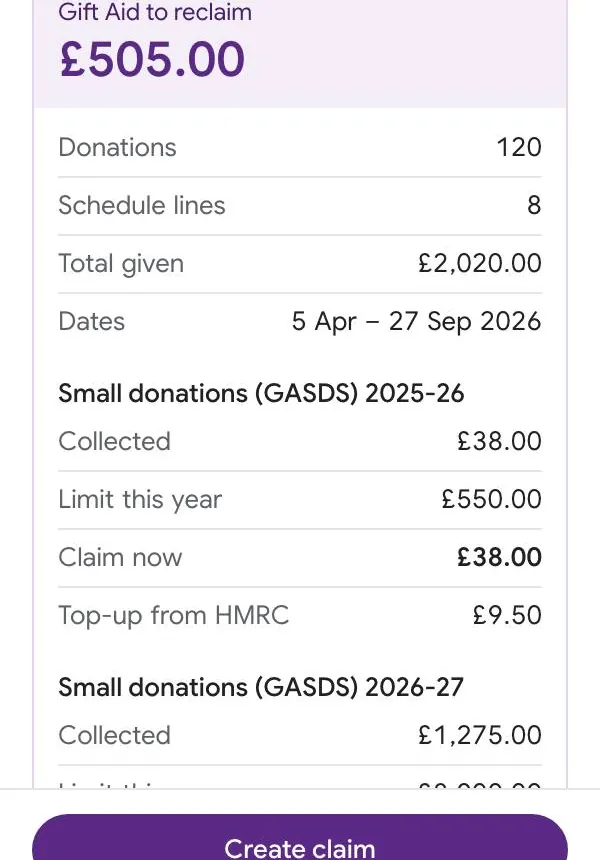
Record cash and contactless collections and see what you can claim each tax year: the lower of £8,000 and 10 times your Gift Aid donations that year, less what you’ve already claimed. You enter that figure in the online form. Each collection is claimed whole, oldest first; any that don’t fit under this year’s limit yet stay unclaimed until more Gift Aid donations raise it. On the free plan, the totals are shown but left out of the claim. If your charity has community buildings or connected charities, check HMRC’s GASDS guidance, because the limit can be different.
Plans
| Feature | Free | Pro |
|---|---|---|
| Donor and declaration checks, one-click fixes | Yes | Yes |
| HMRC schedule download and claim history | Yes | Yes |
| Lines in a claim | Up to 100 | Any number, split into 1,000-line files |
| Combining regular donations, aggregating small gifts | No | Yes |
| Small donations (GASDS) totals | No | Yes |
| Price | Free | £6 a month or £50 a year |
Upgrade from the sidebar.
Payment is handled by Stripe, and Pro unlocks within a few seconds on the Google account you upgraded from. The receipt page shows a licence key, which you can use to move Pro to another account, for example when a new treasurer takes over. Cancel any time from Manage subscription in the sidebar.
Your responsibility
The charity is responsible for its Gift Aid declarations, its records and its claim.
The add-on checks your records against HMRC’s published rules and fills in HMRC’s schedule for you, but it can’t know whether a donor really pays enough tax or whether a gift qualifies. Check the claim before you submit it. The add-on doesn’t submit anything to HMRC.
Security and your donors’ data
- Only this spreadsheet. The add-on can only open the spreadsheet you’re using it in. It can’t see your other files, Gmail or Drive.
- Donor details stay in Google. Names, addresses and donations are checked and the schedule is built by Google Apps Script on Google’s servers. The file goes straight from there to your browser. None of it is ever sent to Onibaku.
- One thing leaves Google: to check your plan, the add-on sends your own Google account’s email address to our licence server.
Details are in our privacy policy.
Help
HMRC says the file has an “ASM” error
HMRC gives this when a schedule has been copied and pasted or saved in the wrong format. Attach the file exactly as downloaded, without opening and saving it in Excel or LibreOffice first. If it still happens, try the other version under Claim options → Schedule file, and email us: we’d like to see the message.
A donation was left out of the claim
Its Check column says why. The usual reasons are a donor with no declaration, a declaration dated after the gift, or a donor ref that doesn’t match the Donors tab.
I made a claim by mistake
If you haven’t submitted it to HMRC, press Cancel next to it under Claims. Its donations go back to unclaimed. Once HMRC has it, press Mark submitted instead.
Which date goes in Box 1?
The add-on fills it in: the earliest donation date in the claim, including gifts inside combined or aggregated lines.
I paid but the add-on still says Free
Reopen the sidebar on the Google account you upgraded from. If you paid from a different account, choose Have a licence key? and paste the key from your receipt page. Still stuck? Email admin@onibaku.co.uk with the email on your Stripe receipt and we’ll sort it the same day.
It says a permission is missing
Google lets you untick permissions when installing. Press Allow access in the sidebar and tick everything, then press check again.
Found a bug, or want a feature? Email admin@onibaku.co.uk.
Google Sheets™, Gmail™, Google Drive™ and Google Apps Script™ are trademarks of Google LLC. This add-on is not made or endorsed by Google or by HMRC.